Beamer is the LaTeX class for creating presentations, and it's the standard at math, physics and engineering conferences and thesis defenses. Its formulas look exactly like the ones in your document, but building the slides frame by frame takes hours.
If you already have the content in a PDF (a paper, your thesis or your lecture notes), you don't need to start from scratch. In this guide you'll see how a Beamer presentation is structured, which theme to choose and how to generate the slides automatically from your document.
Quick answer
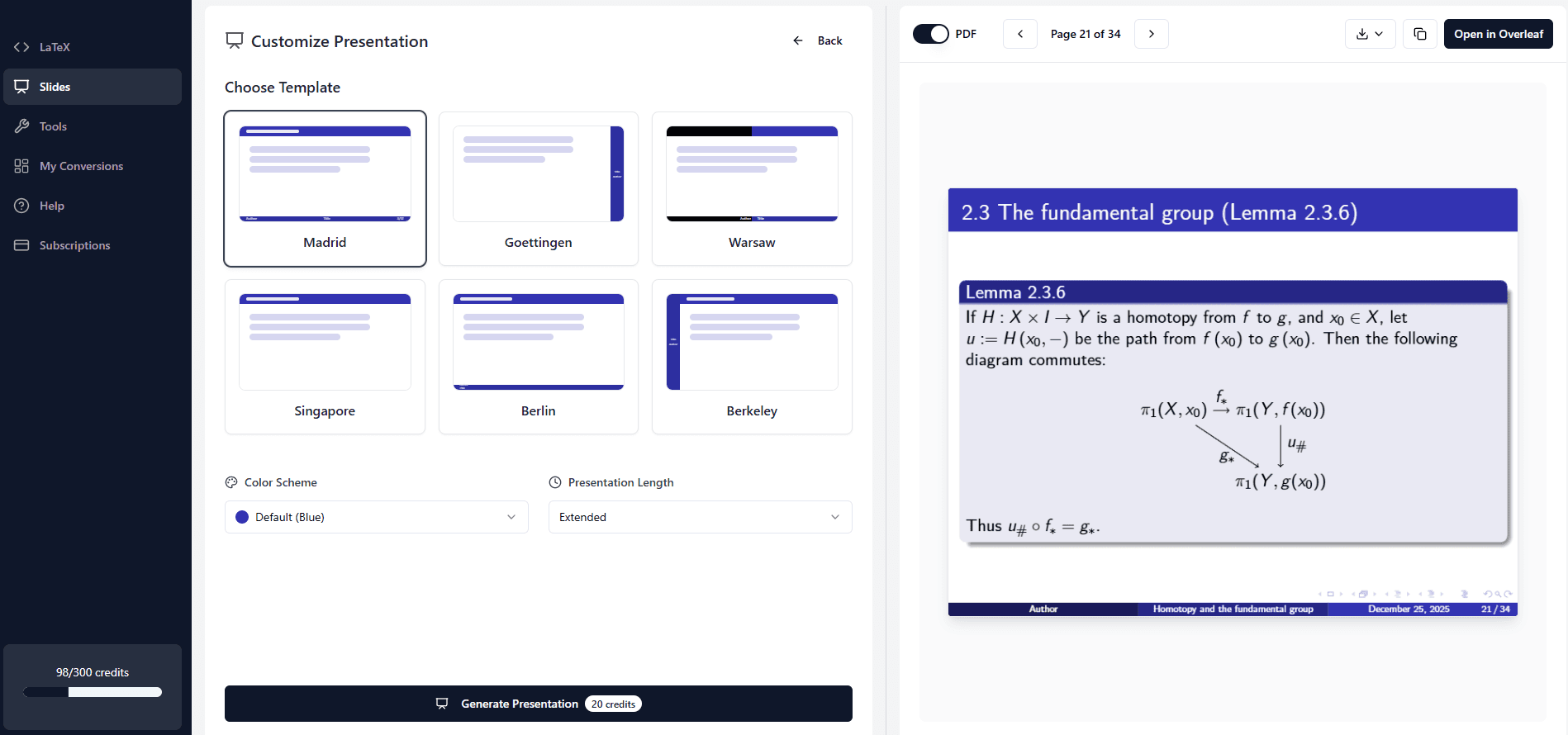
To create a Beamer presentation from a PDF, convert the PDF to LaTeX and then generate the slides from that code. With MathWrite you do both: convert the PDF, choose a theme (Madrid, Berlin, Warsaw…), a color scheme and a length, and you'll get Beamer code that compiles, with a PDF preview you can download or open in Overleaf.
Beamer basics in 2 minutes
A Beamer presentation is a LaTeX document with the beamer class. Each slide is a frame, the look is controlled by a theme (\usetheme) and a color theme (\usecolortheme), and everything else (equations, lists, figures) is written just like in any other LaTeX document:
A minimal Beamer presentation
\documentclass{beamer}
\usetheme{Madrid}
\usecolortheme{seahorse}

\title{The Fundamental Theorem of Calculus}
\author{Your Name}
\date{\today}

\begin{document}

\begin{frame}
  \titlepage
\end{frame}

\begin{frame}{Statement}
  \begin{theorem}
    If $f$ is continuous on $[a,b]$ and $F(x) = \int_a^x f(t)\,dt$,
    then $F'(x) = f(x)$.
  \end{theorem}
\end{frame}

\begin{frame}{Key ideas}
  \begin{itemize}
    \item Differentiation and integration are inverse operations.
    \item<2-> It lets us compute definite integrals with antiderivatives.
  \end{itemize}
\end{frame}

\end{document}
Compile it and you get a title slide and two content slides. The <2-> on the last item makes it appear on the second click, which is handy for revealing ideas one at a time.
Which Beamer theme to choose
Beamer ships with dozens of themes. These are among the most used in academic presentations:
| Theme | Style | Good for |
|---|---|---|
| Madrid | Frame titles in a bar and a footer with author, title and page number | Almost any talk: it's the classic choice |
| Berlin | Header with the sections and navigation dots | Long presentations with several sections |
| Warsaw | Header with section and subsection, rounded blocks with shadows | Conferences and formal talks |
| Goettingen | Sidebar on the right with the table of contents | Thesis defenses and classes |
| Singapore | Minimal, with light navigation at the top | Clean talks with little decoration |
| Berkeley | Sidebar on the left and a prominent frame title | Talks with a very clear structure |
Combine them with a color theme: crane (orange), seagull (gray), seahorse (soft blue-violet) or dove (very light, almost black and white).
How to generate the presentation from your PDF with MathWrite
MathWrite turns your document into a Beamer presentation using only its content: it doesn't invent material, it organizes what you have into slides that don't overflow.
- 1
Convert your PDF to LaTeX
Upload the PDF and choose Turbo if it was generated with LaTeX, or Professional if it's scanned or handwritten (full guide). If you already have the .tex code, you can skip this step.
- 2
Open Slides
In the Slides section, pick the conversion from My LaTeX Generations or paste your LaTeX code.
- 3
Choose theme, color and length
Pick one of 6 themes (Madrid, Goettingen, Warsaw, Singapore, Berlin or Berkeley), a color scheme and the length: brief (5–10 slides), normal (10–30) or extended (30+).
- 4
Generate and review
In a few moments you'll have the Beamer code and the compiled PDF, with a title slide, an outline, the content slides and a conclusion.
- 5
Download it or open it in Overleaf
Download the PDF to present it, or open the project in Overleaf to polish the details.
Turn your document into slides today.
Create a Beamer presentationTips for a good math presentation
- One idea per slide: if a slide needs more than six or seven lines, split it.
- Show the key equations, not every step of the proof. Keep the details for the questions.
- Use
\pauseor overlays (<2->) to reveal a derivation step by step. - Use 16:9 for modern projectors:
\documentclass[aspectratio=169]{beamer}. - Number only the equations you'll refer back to during the talk.
- Rehearse with the PDF in full screen: what looks fine in the editor can look small on a projector.
Frequently asked questions
What is Beamer in LaTeX?
Beamer is a LaTeX document class for creating presentations. Each slide is a frame, and the appearance is controlled with themes and color themes. It's the standard in mathematics and science because formulas look exactly like in your papers.
Can I turn my thesis into slides for the defense?
Yes. Convert the thesis PDF to LaTeX (or use your .tex code), generate the presentation with the extended length and then trim the slides to fit your time slot. If you're still writing it, see our guide to writing your thesis in LaTeX.
Which Beamer theme is the best?
Madrid is the most common and works for almost any talk. For long presentations with many sections, Berlin or Goettingen help the audience know where you are at all times.
Can I edit the presentation afterwards?
Yes. You get the full Beamer code: edit it in MathWrite or open it in Overleaf with one click.
How do I make the slides 16:9?
Add the aspectratio=169 option to the document class: \documentclass[aspectratio=169]{beamer}.
Can I create a Beamer presentation without knowing LaTeX?
Yes. MathWrite generates the complete Beamer code from your document, so you only need to choose the theme, the color scheme and the length.
Create your Beamer presentation in minutes
Create your account, convert your PDF and generate professional slides with the theme you like best.
Start Converting for FreeTrusted by 20,000+ academics worldwide